Manual
Modern "product" manuals aren't built for binding. When they're web pages, you can use any front-end framework and still get an excellent reading and search experience.
Traditional manuals, by contrast, have to account for both binding and the PDF reading experience. Companies usually write them in Word and then export them to PDF for printing and binding.
This approach makes it hard to control the overall document formatting. Even though template documents exist, in my experience I still had to frequently adjust formatting, use the Format Painter, and update headers and footers whenever I added a new page.
Word is clever: it automatically handles a lot of things for you. But sometimes it does more harm than good. I really don't want to learn Office best practices, yet some parts of the product manual must be written by R&D.
Of course, I could just write the content and let someone else handle the formatting. If I handle it myself, writing may take an extra 20 minutes and then it's done, but someone else would need an hour to carefully check it, and mistakes are easy to make.
I've been looking for a framework that lets me focus purely on writing content, like Markdown, and still generates consistently formatted output. There are plenty, but none satisfied me: either the typesetting didn't account for binding, or the exported PDF had no bookmarks, or the Markdown dialect required too many tags.
Yesterday, maybe because I saw that quarkdown had released a new version, I wanted to see whether, after two years of development, it could finally meet my needs. That gradually turned into a thorough round of evaluating and trying out different document frameworks.
The technology stack I finally settled on was Pandoc + LaTeX. In fact, when I was preparing to start this two years ago, searches also recommended this stack: use LaTeX for real typesetting! But I didn't know the LaTeX dialect at all, and two years ago AI couldn't really scaffold a starter project for me. Now it can.

Writing experience
With this framework, you really can produce content using only Markdown, without dealing with any typesetting concerns.
- Sections are numbered automatically, based on Markdown heading levels.
- The table of contents is generated automatically from the sections, and the depth is configurable (heading levels 1–n).
- Figures are numbered automatically.
- The generated PDF has proper bookmarks.
- All whitespace is adjusted uniformly, which is binding-friendly.
- Markdown is close to plain text, and images are stored separately, making version control easy.
A sample of the resulting PDF
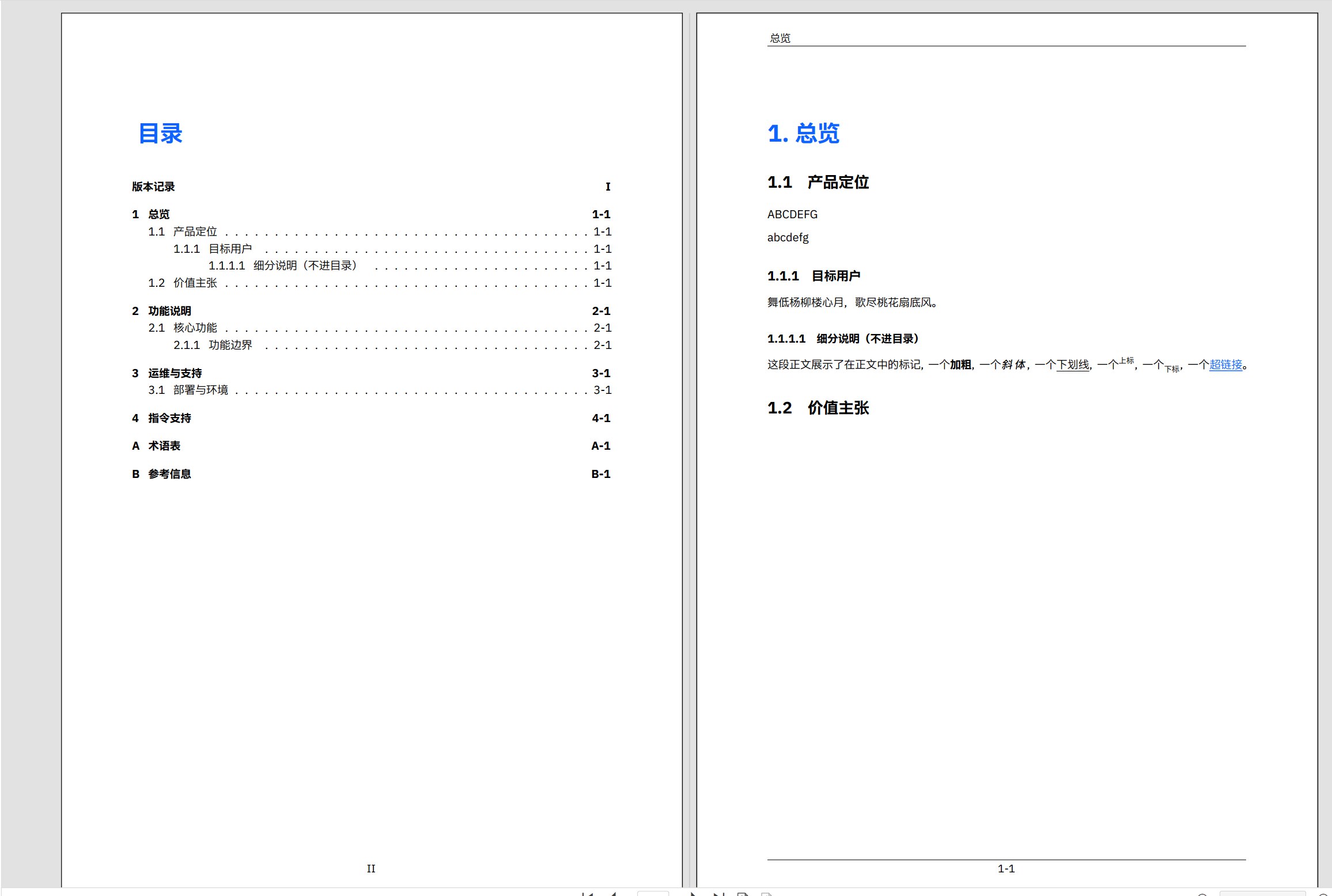
Result
Other features
As a professional typesetting framework, LaTeX naturally supports advanced effects like watermarks and backgrounds. They aren't everyday needs, so just ask GPT about them.