About
🎉 Finally, finally! Under the pressure of Keil's cold green corpse, the company is preparing to switch to GCC. And in my opinion, there's no better solution for integrating a GCC toolchain than CMake (the EIDE plugin is pretty good, too). After a long period of independent exploration, I've finally kicked Keil out for good. Eclipse still can't be fully kicked out yet—TI MCUs still require CCS. When will VS Code finally be adopted everywhere?
Recently, I converted the existing project into a fully CMake-based project and found a few aspects of the project structure that could be optimized.
Tools
There should be a portable VS Code download on the blog's file service page, with all the necessary tools integrated and no installation required.
There's a file named 1_首次打开请运行.bat; double-click it once and VS Code is ready to use. The script's main job is to elevate to administrator mode and automatically add each toolchain's path to the environment variables.
Rationalizing the VS Code Workspace
In the settings section of the .code-workspace file, you can add the following:
"settings": {
    "C_Cpp.formatting": "clangFormat",
    "cmake.configureEnvironment": {
        "PROGRAM_NAME": "H7_GCC_PIONEER"
    }
},
This specifies clangFormat as the formatter. The formatter's executable gets added to the environment variables when you run 1_首次打开请运行.bat.
It also defines a CMake environment variable, which makes it convenient to configure the name of the generated firmware file.
In the main CMakeLists.txt—the one in the root directory—there used to be this:
set(CMAKE_PROJECT_NAME DebugBuild)
Change it to the following:
if(DEFINED ENV{PROGRAM_NAME})
    set(CMAKE_PROJECT_NAME $ENV{PROGRAM_NAME})
else()
    message(WARNING "PROGRAM_NAME environment variable is not set. Using default project name.")
    set(CMAKE_PROJECT_NAME "DefaultProjectName")
endif()
This way, the PROGRAM_NAME in the workspace's .code-workspace file takes precedence. The main reason for doing this is to keep the people developing this project from modifying any CMake-related files as much as possible. More changes aimed at the same goal will follow.
Branches in the Main Build
CMAKEBUILDTYPE is passed into the actual build from the CMake plugin. But in addition to this build type, I also wanted some custom build types, which can be done like this:
Use custom property variables near the front of the main executable build:
set(CMAKE_BUILD_BL "YES")
set(CMAKE_BUILD_BL "NO")
And in the toolchain definition file, we can do this (other files are similar, of course—these property variables from the main build propagate to subdirectories and sub-builds):
if(CMAKE_BUILD_BL MATCHES YES)
    set(CMAKE_C_LINK_FLAGS "${CMAKE_C_LINK_FLAGS} -T \"${CMAKE_SOURCE_DIR}/CPU/GNU/stm32H743XI_INCBL.ld\"")   # 添加链接脚本
endif()
if(CMAKE_BUILD_BL MATCHES NO)
    set(CMAKE_C_LINK_FLAGS "${CMAKE_C_LINK_FLAGS} -T \"${CMAKE_SOURCE_DIR}/CPU/GNU/stm32H743XI.ld\"")   # 添加链接脚本
endif()
This approach controls two different linker scripts: with YES, the linker script includes the bootload section, mainly for factory flashing; with NO, it excludes the bootload section, for upgrades. That removes one more manual step—the EIDE plugin can't do this so conveniently, and you'd have to manually tweak the script every time. Of course, to keep developers from modifying any CMake-related files as much as possible, you can also create an environment variable like in the previous approach.
Defining Post-Build Tasks in the Main Build
At the very end of my main build, there are these two lines:
# 为单独的文件添加编译标签
include("${CMAKE_CURRENT_LIST_DIR}/8_WorkSpace/CMake/toolCmake/extra-compile-flags.cmake")

# 运行一下构建后任务
include("${CMAKE_CURRENT_LIST_DIR}/8_WorkSpace/CMake/toolCmake/post-build-tasks.cmake")
extra-compile-flags.cmake
The contents of this file are as follows:
include(${CMAKE_CURRENT_LIST_DIR}/cmake_func/functions.cmake)

set_compile_flags_for_matching_files(${CMAKE_PROJECT_NAME} "6_Rtos|7_Exlib" "-w")
set_compile_flags_for_matching_files(user_src "6_Rtos|7_Exlib" "-w")
Its purpose is to add the -w compile flag—meaning “ignore all warnings”—to the sources under the 6_Rtos or 7_Exlib folders in both the main build target ${CMAKE_PROJECT_NAME} and the source-importing target user_src. Since we've enabled ultra-strict warnings-for-everything, the OS or some third-party libraries may have some warnings that are very annoying but can't be fixed, hence this workaround. Note that, because user_src was originally defined entirely with the INTERFACE property, compile flags can't be properly added to the sources inside it; so the target_sources part should now be defined with the PUBLIC property. No unacceptable side effects have been found so far.
The first argument is the target name, the second is the keyword that a source file's path must contain, and the third is the compile flag you want to add. This introduces yet another new file—functions.cmake, as follows:
# FUNC

# 递归包含头文件的函数
function(include_sub_directories_recursively root_dir)
    if (IS_DIRECTORY ${root_dir})               # 当前路径是一个目录吗,是的话就加入到包含目录
        #        if (${root_dir} MATCHES "include")
        message("include dir: " ${root_dir})
        target_include_directories(${PROJECT_NAME} INTERFACE
        ${root_dir}
        )
        #        endif()
    endif()

    file(GLOB ALL_SUB RELATIVE ${root_dir} ${root_dir}/*) # 获得当前目录下的所有文件,让如 ALL_SUB 列表中
    foreach(sub ${ALL_SUB})
        if (IS_DIRECTORY ${root_dir}/${sub})
            include_sub_directories_recursively(${root_dir}/${sub}) # 对子目录递归调用,包含
        endif()
    endforeach()
endfunction()

# 给某个目标,路径带有关键词的源文件,添加期望添加的标签(例如"-w")
function(set_compile_flags_for_matching_files target_name keywords compile_flags)
    # 获取目标的原始源文件列表
    get_target_property(src_list ${target_name} SOURCES)

    # 检查目标是否存在并有源文件
    if(NOT src_list)
        message(WARNING "Target '${target_name}' does not exist or has no sources.")
        return()
    endif()

    # 创建一个新的列表用于存放需要设置编译标志的文件
    set(filtered_src_list)

    # 遍历原始的源文件列表,筛选出需要的文件
    foreach(src_file IN LISTS src_list)
        if("${src_file}" MATCHES "${keywords}")
            list(APPEND filtered_src_list ${src_file})
        endif()
    endforeach()

    # 为筛选出的源文件设置编译标志
    foreach(src_file IN LISTS filtered_src_list)
        set_source_files_properties(${src_file} PROPERTIES COMPILE_FLAGS "${compile_flags}")
    endforeach()
endfunction()


# FUNC END
This is a file I use specifically for writing CMake functions. I won't go into too much detail—whenever a function is needed, it just gets included.
post-build-tasks.cmake
This file is for conveniently managing post-build tasks. Its contents are as follows:
# 单独管理构建后的任务

# 定义工具链工具
set(OBJCOPY arm-none-eabi-objcopy)
set(OBJDUMP arm-none-eabi-objdump)

# 添加自定义命令生成 bin 和 hex 文件
add_custom_command(TARGET ${CMAKE_PROJECT_NAME} POST_BUILD
    COMMAND ${OBJCOPY} -O binary $<TARGET_FILE:${CMAKE_PROJECT_NAME}> ${CMAKE_PROJECT_NAME}.bin
    COMMAND ${OBJCOPY} -O ihex $<TARGET_FILE:${CMAKE_PROJECT_NAME}> ${CMAKE_PROJECT_NAME}.hex
    COMMAND  ${CMAKE_CURRENT_LIST_DIR}/gccMapView.exe ${CMAKE_BINARY_DIR}
    COMMENT "Generating bin and hex files from elf"
)
This generates the bin and hex files. It then runs gccMapView.exe, a small tool I made for organizing the map file. GCC's original map output is just ugly, which is why this tool exists. The open-source repo link is here, and the results are quite good:

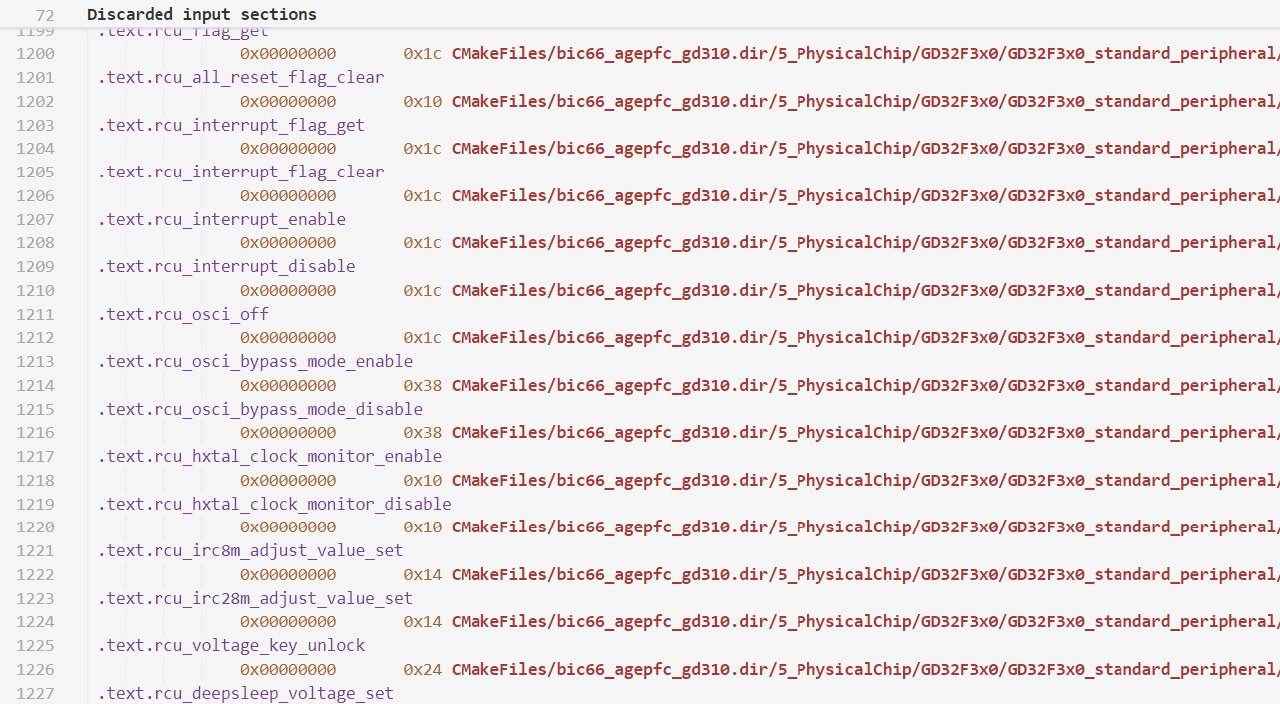
Original map.png
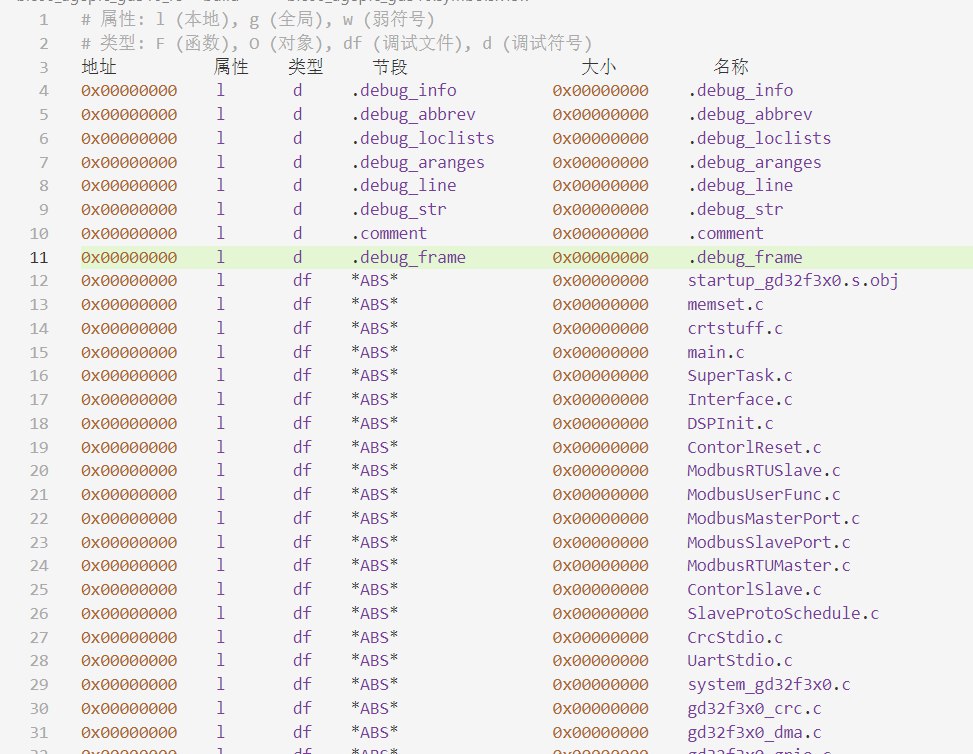
Sorted output.png
Automating Project Source Import with Recursive Search
To traverse the header file paths of the project sources and include them, there's this part:
# cmake FUNC
include(${CMAKE_CURRENT_LIST_DIR}/cmake_func/functions.cmake)

# 递归包含头文件
include_sub_directories_recursively(${CMAKE_CURRENT_LIST_DIR}/../../../1_App)
include_sub_directories_recursively(${CMAKE_CURRENT_LIST_DIR}/../../../2_Contorl)
include_sub_directories_recursively(${CMAKE_CURRENT_LIST_DIR}/../../../3_Module)
include_sub_directories_recursively(${CMAKE_CURRENT_LIST_DIR}/../../../4_Driver)
This calls the CMake functions, which are defined in the unified function definition file. Its purpose is to add every path under these four folders—subdirectories included—to the include path.
There's also this part:
# 递归查找所有源码文件
file(GLOB_RECURSE 1_APP_SRC ${CMAKE_CURRENT_LIST_DIR}/../../../1_App/*.c)
file(GLOB_RECURSE 2_CONTORL_SRC ${CMAKE_CURRENT_LIST_DIR}/../../../2_Contorl/*.c)
file(GLOB_RECURSE 3_MODULE_SRC ${CMAKE_CURRENT_LIST_DIR}/../../../3_Module/*.c)
file(GLOB_RECURSE 4_DRIVER_SRC ${CMAKE_CURRENT_LIST_DIR}/../../../4_Driver/*.c)
file(GLOB_RECURSE 5_DRIVER_SRC ${CMAKE_CURRENT_LIST_DIR}/../../../5_PhysicalChip/Stm32H7/*.c)

target_sources(${CMAKE_PROJECT_NAME} PUBLIC
    ../../../main.c
    ${1_APP_SRC}
    ${2_CONTORL_SRC}
    ${3_MODULE_SRC}
    ${4_DRIVER_SRC}
    ${5_DRIVER_SRC}
)
Its purpose is to add all the source files under these four folders, including subdirectories, to the target sources.
For the lower-level parts, the RTOS, or imported libraries, the sources and include paths are still specified manually.
With this done, all the messy business source code can be written and modified freely. Previously, renaming something or tweaking the structure meant changing a ton of project configurations everywhere; now business code can be developed completely smoothly. Business code and driver support are further decoupled.
Here's the change mentioned earlier: the target_sources part should now be defined with the PUBLIC property; otherwise, there's no way to specify compile flags for individual files. With the INTERFACE property, although the sources do get compiled and attached to the main build target, CMake doesn't have an actual file instance for them. Essentially, they're virtually attached to the source-importing target user_src—but user_src is also an INTERFACE virtual library that never actually compiles. As a result, all the sources are linked into the main build as the whole user_src target; you can no longer pinpoint any specific file, and they just inherit the main build's compile flags during compilation.